Checking your Morocco eVisa status is a straightforward process through the official portal at acces-maroc.ma. You need only your application number and the email address you used when applying. The tracking system works around the clock and displays your current status within seconds – whether your visa is still being processed, has been approved, or requires additional action.
Only eVisa applications submitted online can be tracked this way. Traditional visa applications filed at a Moroccan embassy or consulate must be checked by contacting the diplomatic mission directly.
How to Check Morocco Visa Status Online
Follow these steps to track your Morocco eVisa application on the official government portal:
- Visit the official portal at acces-maroc.ma – look for the “Track My eVisa Application” option on the homepage
- Enter your application number – this is the reference number from your confirmation email (sometimes called Order ID or File Number)
- Enter your email address – use the exact email you provided during your eVisa application
- Click “Track” – your current visa status will appear on screen
The tracking tool is available 24 hours a day, 7 days a week. You can check your status as many times as you want – checking does not delay or affect your application in any way.
Where to Find Your Application Number
Your application number was sent in the confirmation email you received immediately after submitting your eVisa application. Check:
- Your inbox – search for emails from acces-maroc.ma or the Moroccan Ministry of Foreign Affairs
- Spam or junk folder – confirmation emails sometimes get filtered incorrectly
- Promotions tab – if you use Gmail, check the Promotions or Updates tabs
The application number is typically a combination of letters and numbers. Enter it exactly as shown – it may be case-sensitive.
What Each Morocco eVisa Status Means
After entering your details, the system will display one of the following status types:
| Status | What It Means | What to Do |
|---|---|---|
| In Process / Pending | Your application is under review by immigration authorities | No action needed – wait 24 to 72 hours and check again |
| Approved | Your eVisa has been approved and sent to your email | Check inbox and spam folder – download and print the PDF |
| Application Completed | Your submission was received but not yet fully reviewed | Wait for status update – this is a normal intermediate stage |
| Rejected | Your application was declined by Moroccan authorities | Review the rejection reason – you can reapply or visit an embassy |
| Unknown / Not Found | The details entered do not match any application | Double-check your application number and email for typos |
In Process / Pending
This is the most common status. It means your Morocco eVisa application is actively being reviewed. Immigration officers are verifying your documents, passport details, and background checks. Standard processing takes 24 to 72 hours through the official portal, but it can take longer during peak travel seasons or if additional verification is needed.
No action is required from you at this stage. Avoid submitting a duplicate application – this can cause confusion and delays.
Approved
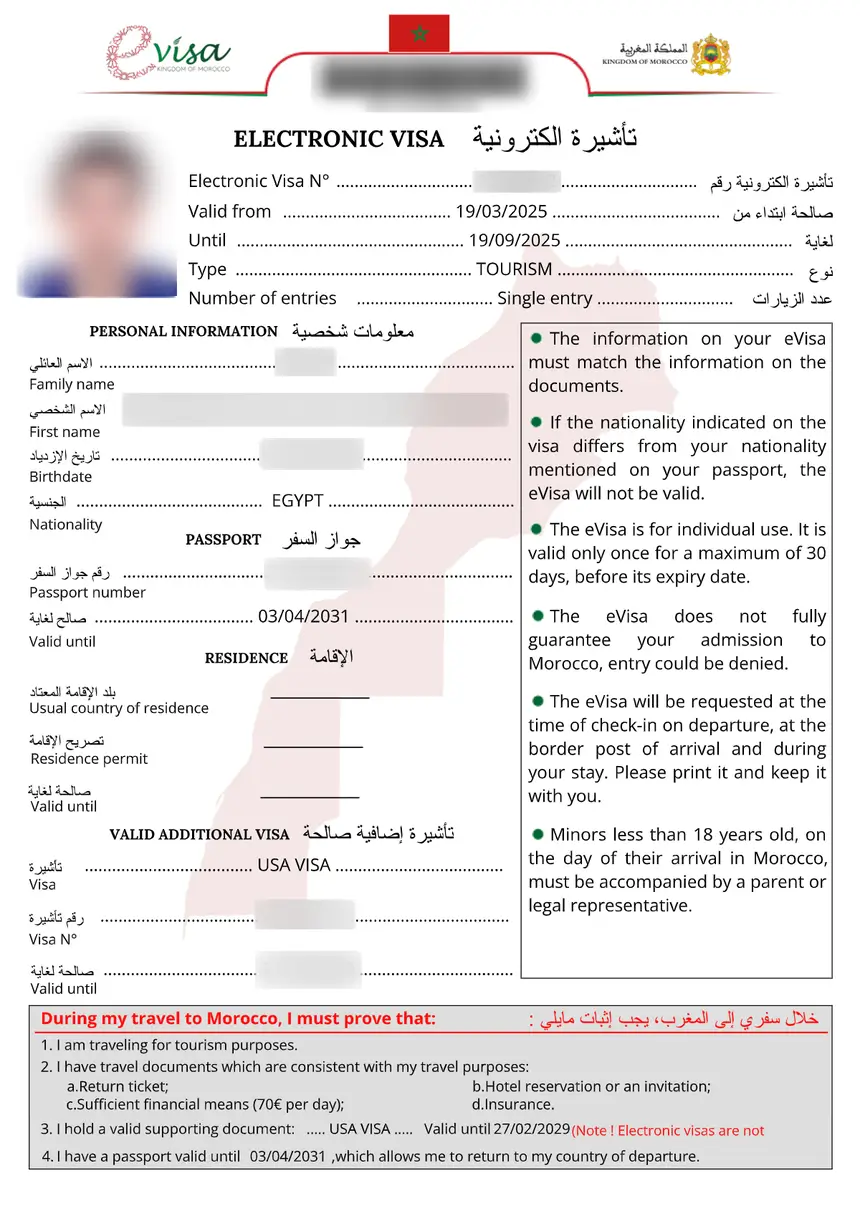
Your eVisa has been approved. The system sends the approved eVisa as a PDF attachment to your registered email address. If you do not see it in your inbox:
- Check your spam or junk folder
- Check your Promotions tab (Gmail users)
- Search your email for “eVisa” or “Morocco”
- Wait up to 24 hours – emails can sometimes be delayed
Once you receive the PDF, print at least two copies and save a digital copy on your phone and cloud storage. You will need to present your eVisa at the airport when boarding your flight and at immigration upon arrival in Morocco.
Rejected
If your application is rejected, the status page will include the reason for rejection. Common reasons include:
- Passport validity less than 6 months
- Incomplete or missing documents
- Incorrect personal information
- Applying under the wrong eligibility category
- Blurry or unreadable passport scan
You can reapply immediately after addressing the issue that caused the rejection. There is no waiting period. Alternatively, you can apply for a traditional sticker visa through the nearest Moroccan embassy or consulate. For more details, see our guide on Morocco visa requirements.
Information You Need to Check Your Status
To track your Morocco visa status, you will need:
- Application Number (Order ID / File Number) – the unique identifier from your confirmation email
- Email Address – the exact email you used when applying
You cannot check your Morocco visa status with only your passport number. The application number and email address are both required.
| Information Required | Where to Find It |
|---|---|
| Application Number | Confirmation email from acces-maroc.ma |
| Email Address | The email you provided during application |
If you have lost your confirmation email and cannot find your application number, contact the eVisa support team through the official portal. Provide your full name, passport number, and approximate application date for assistance.
Morocco eVisa Processing Timeline
Understanding the processing stages helps you know when to expect updates:
| Stage | Timeline | What Happens |
|---|---|---|
| Day 1: Submission | Immediate | You submit your application and receive a confirmation email with your application number |
| Days 1-2: Initial Review | Within 24 hours | Officers verify that your documents are complete and meet requirements |
| Days 2-3: Document Verification | 24-48 hours | Your passport scan, photo, and supporting documents are checked for accuracy |
| Days 3-5: Background Screening | 48-72 hours | Security checks are conducted against immigration databases |
| Day 5: Final Decision | Varies | Your application is approved or rejected – you receive notification by email |
Most Morocco eVisa applications are processed within 24 to 72 hours. However, some applications may take longer if:
- You apply during peak travel season (June-August, December holidays)
- Additional security screening is required for your nationality
- Your documents need clarification or resubmission
- The system experiences high application volume
If your application has been in process for more than 5 business days, check your email for any requests for additional information. If you find nothing, contact support through the official portal.
Troubleshooting Common Status Check Problems
Application Number Not Recognized
If the system says your application number is not found:
- Check for typos – the number may be case-sensitive
- Remove extra spaces before or after the number
- Wait 24 hours after submission – it can take time for new applications to appear in the system
- Try a different browser – clear your cache and cookies, then try again
Website Not Loading
The official portal at acces-maroc.ma occasionally goes down for maintenance or experiences high traffic. If the page does not load:
- Try again in 30 minutes to 1 hour
- Clear your browser cache and cookies
- Try a different browser (Chrome, Firefox, Safari, Edge)
- Check from a different device (phone vs. computer)
Email Notifications Not Arriving
The system sends automatic emails at key stages. If you are not receiving them:
- Check your spam/junk folder – this is the most common issue
- Add the sender to your contacts – this prevents future emails from being filtered
- Check your Promotions tab if using Gmail
- Verify your email address – make sure the email you provided during application is correct
Status Stuck on “In Process” for More Than 7 Days
If your application has been pending for over a week:
- Check your email (all folders) for requests for additional documents
- Log in to your account on acces-maroc.ma – some updates appear only in the portal, not via email
- Contact support through the official portal’s contact form
- Do not submit a new application unless instructed to do so
What to Do After Your Morocco eVisa Is Approved
Once your status shows “Approved,” take these steps before your trip:
- Download the eVisa PDF from your email and save it on multiple devices
- Print two copies on standard paper – one for your carry-on, one as backup
- Verify all details – check that your name, passport number, dates, and visa type match your passport exactly
- Save a digital copy on your phone and in cloud storage (Google Drive, iCloud, Dropbox)
- Prepare your travel documents – you will need your passport, printed eVisa, return ticket, and proof of accommodation at the airport and upon arrival
Your Morocco eVisa is valid for 30 days of stay within a 180-day validity period from the date of issuance. It is a single-entry visa. If you need to stay longer or leave and re-enter Morocco, you may need to apply for an extension or a new visa. For more details, see our Morocco eVisa complete guide.
Consular Visa Applications: How to Check Status
If you applied for a Morocco visa through an embassy or consulate rather than the eVisa system, you cannot track your status online. Here is what to do:
- Contact the embassy or consulate where you submitted your application directly by phone or email
- Provide your application reference number and passport details
- Allow 5 to 15 working days for standard consular processing before making inquiries
- Visit in person if phone or email inquiries do not yield results
Consular visa processing times vary by embassy and nationality. During peak travel seasons, expect delays of up to 20 working days. Plan ahead and apply well in advance of your travel date.
For a full comparison of eVisa and consular processing, see our Morocco visa processing time guide.
FAQs About Morocco Visa Status Check
How do I check my Morocco visa status online?
Visit the official portal at acces-maroc.ma and select “Track My eVisa Application.” Enter your application number and email address, then click “Track” to see your current status.
Can I check my Morocco visa status with just my passport number?
No. You need both your application number (Order ID) and the email address you used when applying. The passport number alone is not sufficient to access the tracking system.
How long does Morocco eVisa processing take?
Most eVisa applications through the official portal at acces-maroc.ma are processed within 24 to 72 hours. Third-party services may take 3-6 working days for standard processing. Consular visas take 5-15 working days.
What does “In Process” mean for my Morocco visa?
“In Process” means your application is being reviewed by Moroccan immigration authorities. Your documents and background are being verified. No action is needed from you – just wait and check again after 24-48 hours.
What should I do if my Morocco eVisa is rejected?
Review the rejection reason provided on the status page. You can reapply immediately after correcting the issue (such as providing a clearer passport scan or fixing incorrect information). There is no waiting period to reapply. You can also apply for a traditional visa at a Moroccan embassy.
Where do I find my Morocco eVisa application number?
Your application number was sent in the confirmation email you received right after submitting your application. Check your inbox, spam folder, and Promotions tab for an email from acces-maroc.ma.
My status shows “Approved” but I did not receive the email. What do I do?
Check your spam, junk, and Promotions folders. Search your email for “eVisa” or “Morocco.” If you still cannot find it, log in to your account on acces-maroc.ma – you may be able to download the eVisa directly from the portal. Wait up to 24 hours as emails can be delayed.
Can I check my Morocco visa status offline?
No. The online tracking system requires an internet connection. You can access it from any device – smartphone, tablet, or computer. If you applied through an embassy, contact the consulate directly by phone for offline status updates.
How often should I check my Morocco eVisa status?
Checking once every 24 hours is sufficient. The system updates in real time, and you will also receive email notifications at key stages. Checking more frequently will not speed up the process.
What does “Unknown” or “Not Found” mean when checking my visa status?
This usually means the application number or email address was entered incorrectly. Double-check both fields for typos and extra spaces. If your application was recently submitted, wait 24 hours for it to appear in the system.
Can I track a Morocco visa application submitted through a third-party service?
Yes, but you will need to use the tracking system of the third-party service where you applied, not the official acces-maroc.ma portal. Check the confirmation email from the service for their tracking link and your reference number.
What documents do I need to print for my approved Morocco eVisa?
Print your eVisa PDF on standard paper. You do not need any special format. Keep at least two printed copies – one in your carry-on bag and one as backup. Also save a digital copy on your phone for emergencies.